A Chrome extension for QuickBooks® Online + Xero®

Fewer clicks and clacks…
Work faster in Xero and QuickBooks.

Designed by Rachel to make your life easier.

  • Freeeveryday shortcuts
  • Proadvanced workflows
  • Google Chromeavailable now
Rachel smiling in festive glasses
quickbooks.intuit.com
Expenses
SupplierDateAmount
Northstar Office24 Sep£486.20
Brighton Studio22 Sep£1,250.00
J. Patel & Co.19 Sep£92.40
RachelsToolsFREE
RecentCustomersSuppliers
  • INInvoice 1048Northstar Office£486.20
  • BLBill 2281J. Patel & Co.£92.40
  • EXExpense 580Brighton Studio£1,250
⇧ Shift + double-click to open in a new window
JOURNAL Quick Adjustment Journals
Quick and simple import/export
NOTES Popup warning from notes
MEMO In QuickBooks, quickly fill in statement memo
CREDIT Credit warning
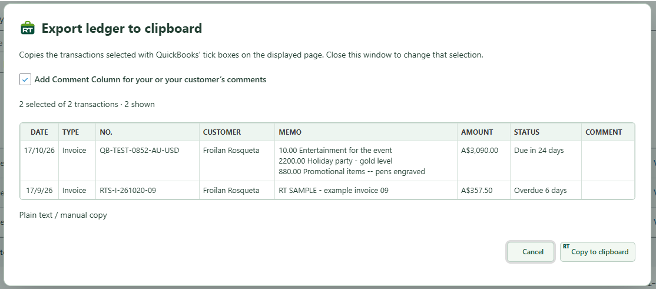
COPY Quickly copy transaction information to the clipboard
VOID Retain transaction details on VOIDED transaction
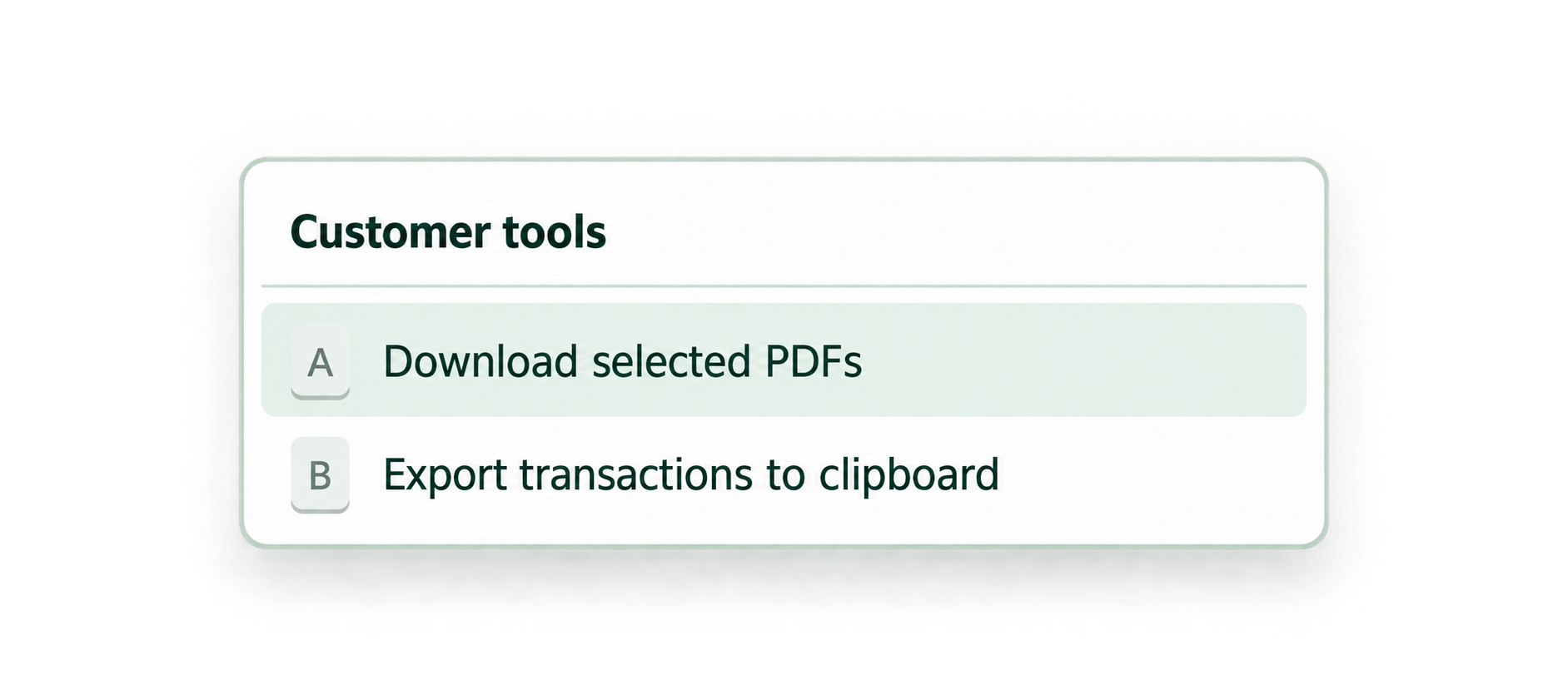
SEND Quickly send multiple invoices via PDF
Built forQuickBooks OnlineXeroGoogle Chrome

Key features

Built for business owners, bookkeepers, accountants and finance teams, RachelsTools adds shortcuts and checks while keeping QuickBooks and Xero in charge of your accounting workflow.

QuickBooks

All QuickBooks features

In both QuickBooks and Xero

Video guides

See the shortcuts in action.

Choose your accounting platform to watch every published RachelsTools tutorial in one place.

See RachelsTools at work

The top 10 small changes.
One much quicker day.

Follow the tour, or choose a number to jump straight to the task that slows you down.

Hide the QuickBooks toolbar. — screen 1 of 1

Choose your workflow

Start Standard.
Step up when you need more.

Standard

FREE

Practical shortcuts for everyday work.

Toolbar7 features
  • QHide the QuickBooks left-hand menuv0.90

    Automatically collapse the QuickBooks left-hand menu after a configurable delay, three seconds by default, to free up working space.

  • XQCreate a multilevel favourites menuv0.90

    Organise company and global favourites into folders for Xero and QuickBooks. Synchronise supported favourites after connecting and enabling sync.

  • XQSynchronise settings and recent lists across computersv0.90

    Connect your account and switch on only the categories you want to carry between computers. Each switch saves immediately. Standard includes settings sync; recent lists and folder sync require the corresponding server support and your selected choices.

  • XQSet a company colourv0.90

    Assign each Xero or QuickBooks company a colour so you can identify the active company at a glance.

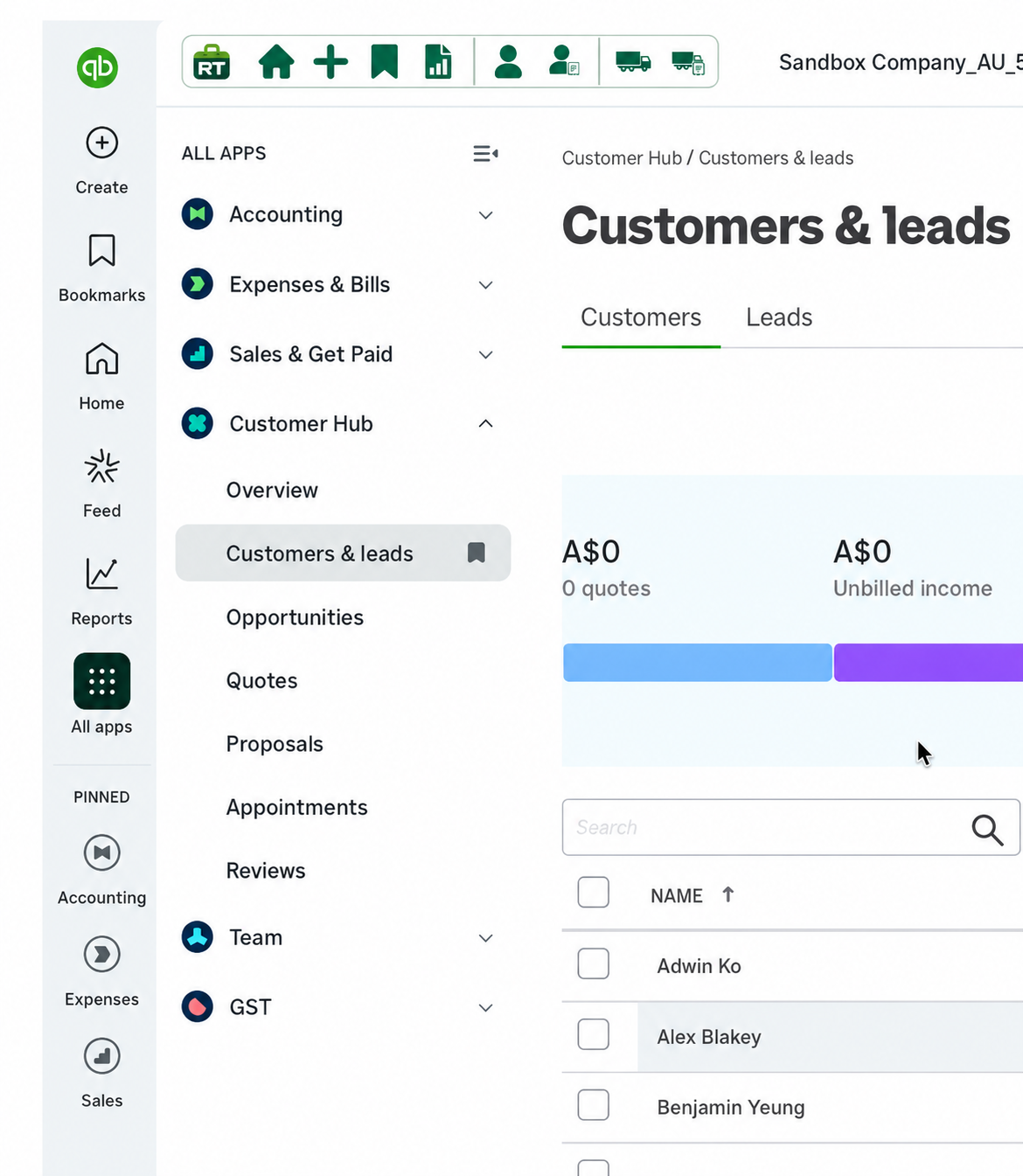
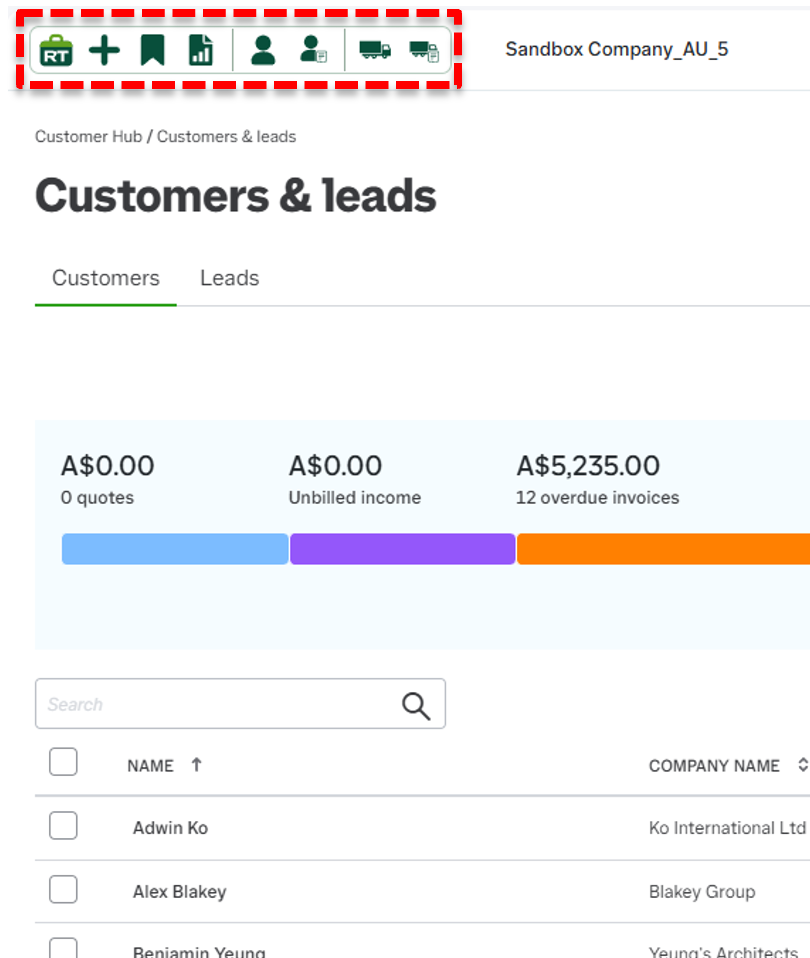
  • XQRachel’s Toolbar quick menuv0.90

    A toolbar displayed in the top-left corner of the main Xero and QuickBooks screens.

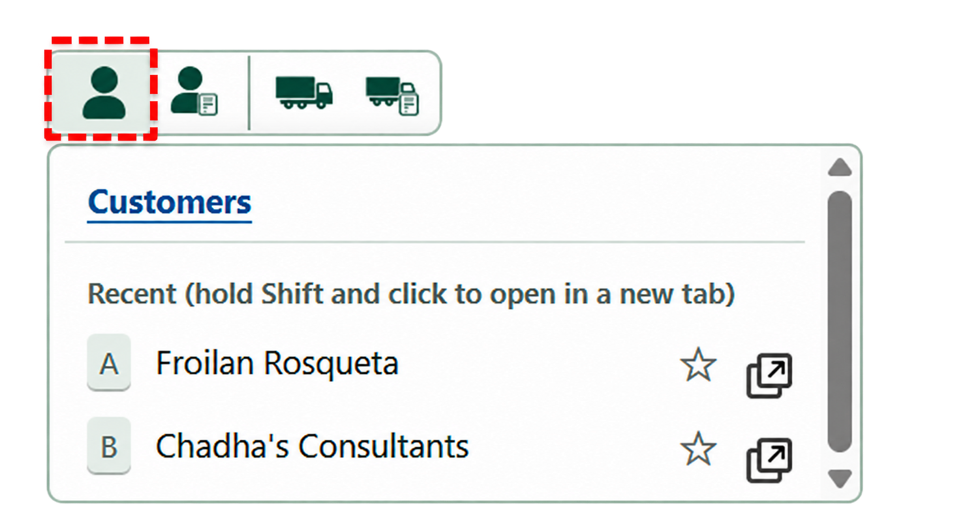
  • XQRachel’s recent customer and supplier listv0.90

    Quickly return to recent or favourite customers and suppliers. Standard includes four places per menu, shared between favourites and recents; Pro allows larger lists.

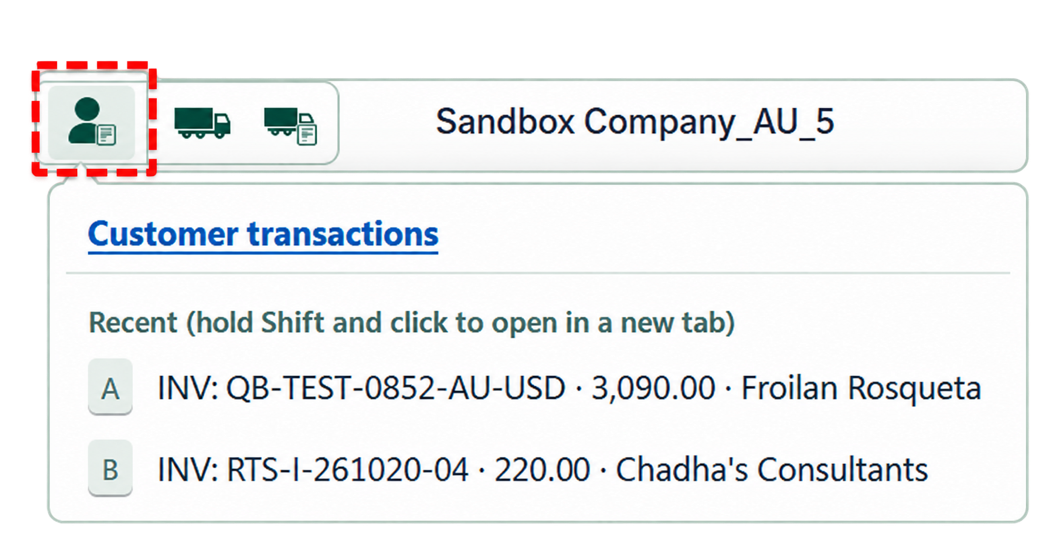
  • XQRachel’s recent transaction listv0.90

    Quickly return to recently opened or saved transactions. Standard includes four places per menu, shared between favourites and recents; Pro allows larger lists.

Transactions3 features
  • QDouble-click a transaction to edit itv0.90

    Double-click a supported transaction row to open it for viewing or editing without locating the View/Edit link.

  • QDouble-click a customer or supplier to open their ledgerv0.90

    Double-click a customer or supplier name in a supported transaction list to open their ledger.

  • QQuickly change the ledger filterv0.90

    Use a button to quickly display open, overdue, or all transactions from the past 3, 6, or 12 months.

Transaction Entry2 features
  • QAccess a customer or supplier ledger from a transactionv0.90

    An additional button beside the customer or supplier takes you directly to their ledger.

  • QEmail a copy to yourselfv0.90

    Prepare the recipients in QuickBooks to send a transaction to yourself, the customer or both, then review and send using QuickBooks.

Banking1 feature
  • QGemini search for a bank referencev0.90

    Copy a bank-reference research question and open Gemini to investigate the likely payee. Standard includes a separate Google search option.

Pro

5-DAY FREE TRIAL
$20/monthor $180/year · save 25%5–9 users: 10% off
10+ users: 25% off
Transactions6 features
  • XOpen a Xero transaction in a new tabv0.90

    Use the icon on supported Xero transaction rows to open transactions in background tabs while keeping the list open.

  • QPrint Journalv0.90

    Print a journal while entering it.

  • QOpen Audit Historyv0.90

    Open Audit History in a separate tab.

  • XQEnhanced export to clipboardv0.90

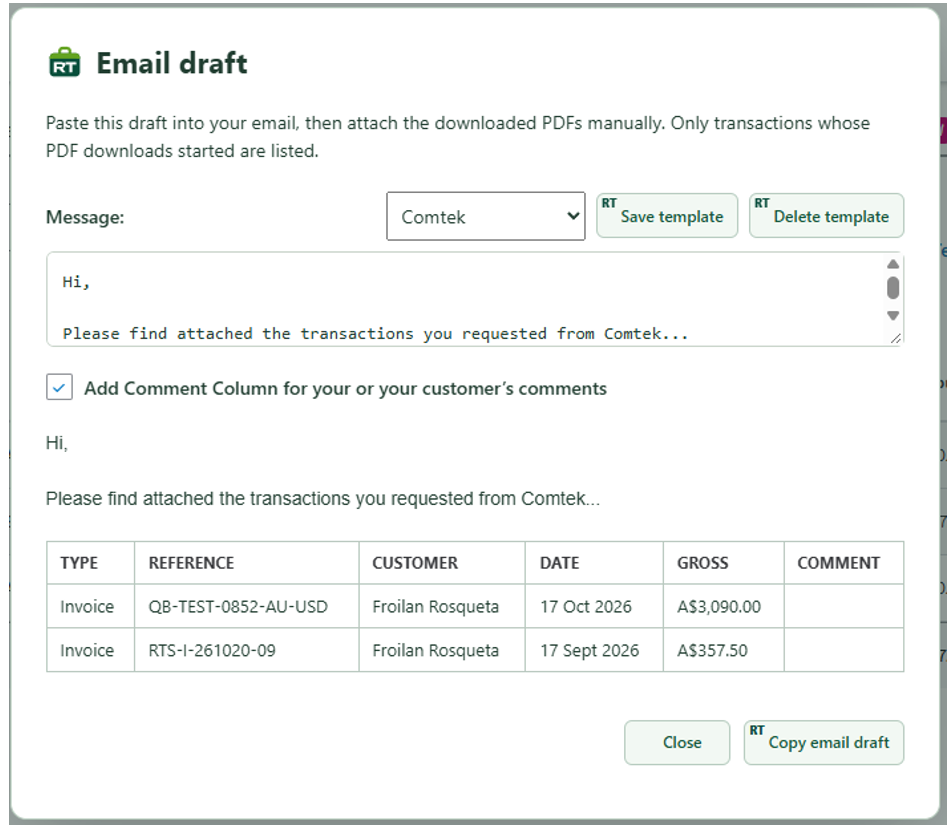
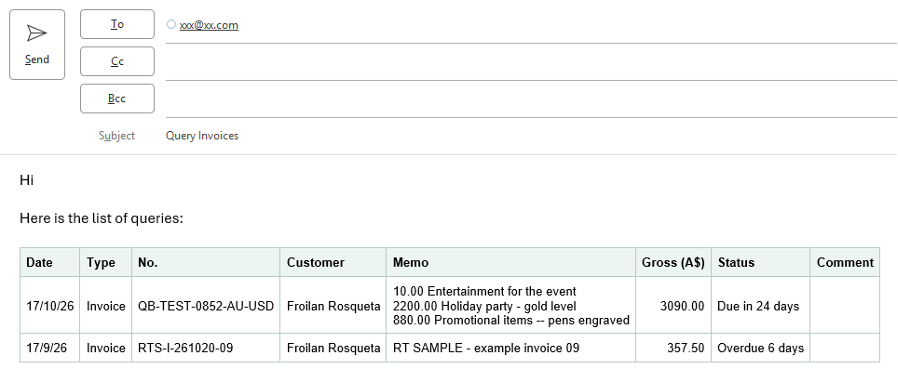
    Export all or selected items on supported QuickBooks sales, bills, expense, customer or supplier ledgers to a spreadsheet or email, with an optional client comment column.

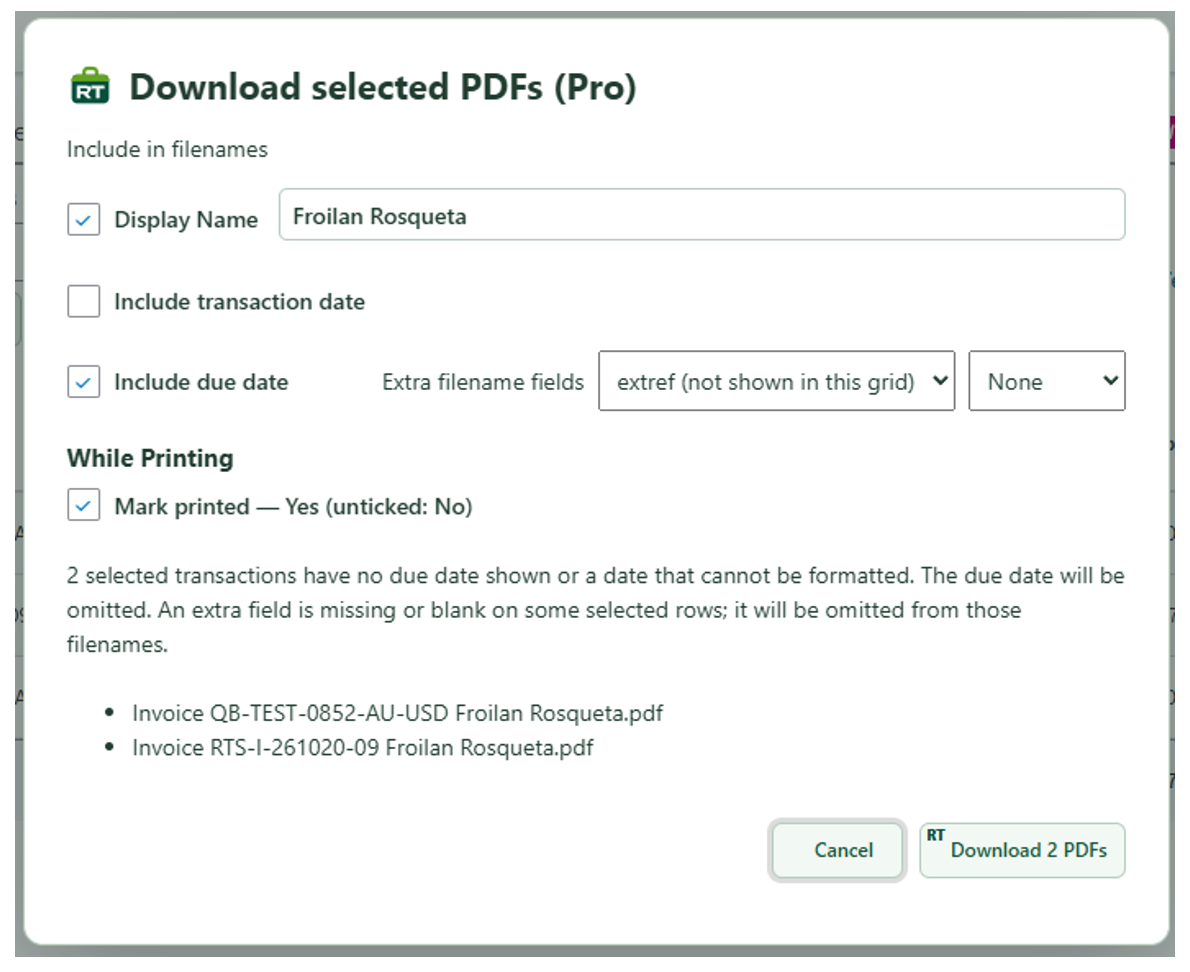
  • QDownload multiple invoice PDFsv0.90

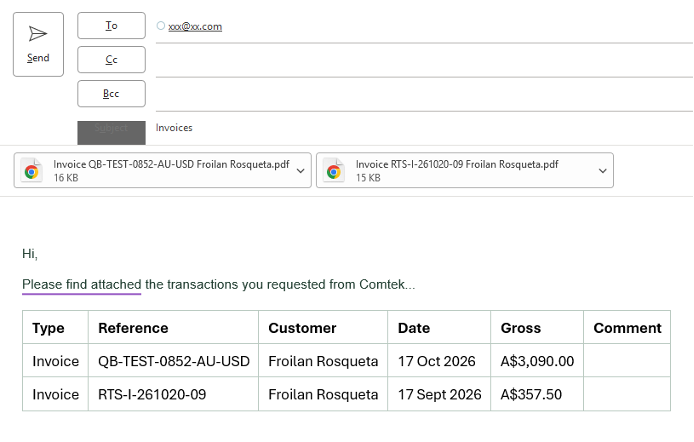
    Download selected QuickBooks invoice PDFs with automatic filenames. Copy an accompanying email-ready transaction table, optionally including a client comment column.

  • XQFind Last Placev1.0

    Use the Last place button to scroll back to the item you last drilled into or opened.

Transaction Entry12 features
  • QReview outstanding balances and transactionsv0.90

    Open the QuickBooks notes panel to review open and overdue balances and available outstanding transactions. The list reflects the current ledger page and filters; cached details can be refreshed. Automatic warnings use marked notes.

  • XQPop-up customer and supplier notesv1.1

    Access customer or supplier notes from within a transaction and optionally display them as warnings.

  • XQDuplicate a transaction linev0.90

    Duplicate and edit a transaction line in QuickBooks without re-entering the same details. Included with Standard; Xero duplication is available with Pro.

  • QAutomatic statement memov0.90

    Automatically adds the line details and a transaction summary to the statement memo.

  • QPreserve invoice details before voidingv0.90

    Before voiding a QuickBooks invoice, save the reason and original line details in Message on invoice, then continue to the native void confirmation.

  • XFreeze column headingsv0.90

    Keep column headings and the customer/supplier column visible while scrolling supported lists. Particularly useful on long bills and invoice screens.

  • XQFind and Replacev1.0

    Replace repeated wording across lines in the current draft, with a preview before applying.

  • QTransaction review pop-upv0.90

    Review selected transaction fields together before saving. Standard includes the review pop-up; enforcing required fields is a separate Pro feature.

  • QRequire selected transaction fieldsv0.90

    Choose fields that must be completed before saving a supported transaction. Required-field enforcement adds Pro protection to the Standard review pop-up.

  • XQLock – change a stock codev1.1

    Use the lock button in a QuickBooks transaction to change the stock code without replacing the existing line description or price.

  • QJournal entry balancev0.90

    See the journal out-of-balance figure while entering a journal.

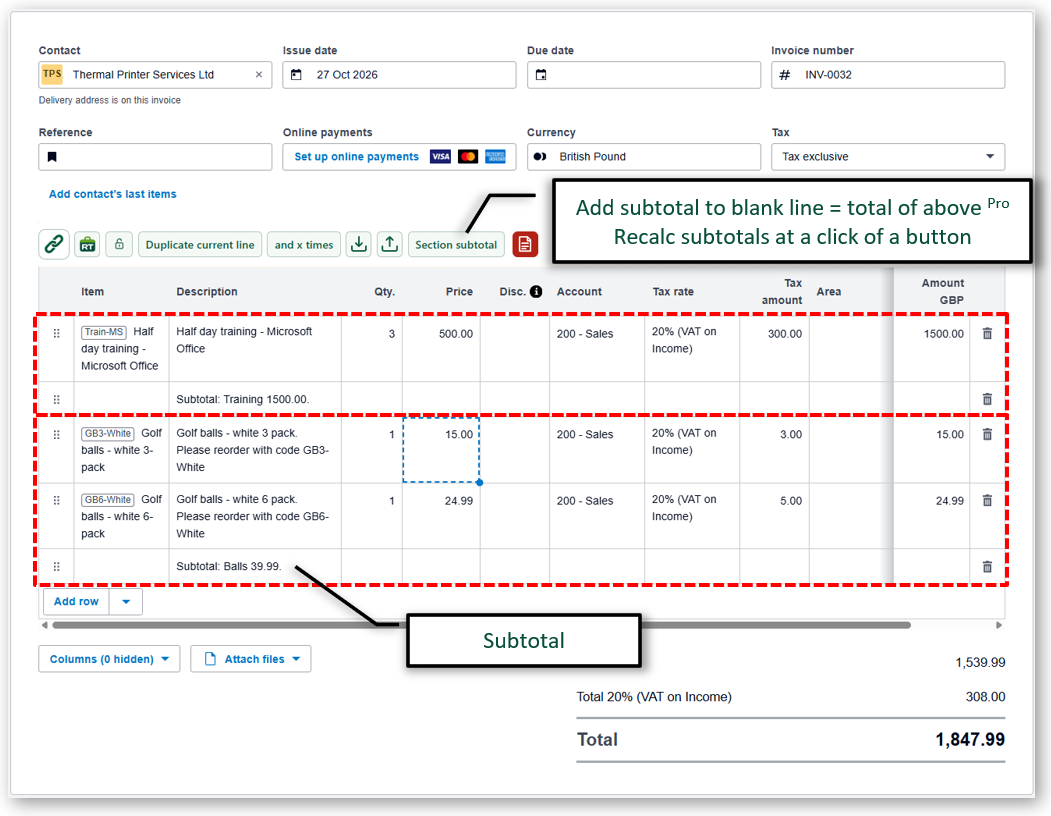
  • XSub totalsv0.90

    Select a group of lines and calculate a Labour, Materials or other section subtotal. Optionally insert a description-only subtotal line. Position on a line to total the lines above; if a subtotal is already present, recalculate it after edits. This helper does not create a native, automatically recalculating subtotal row.

Import2 features
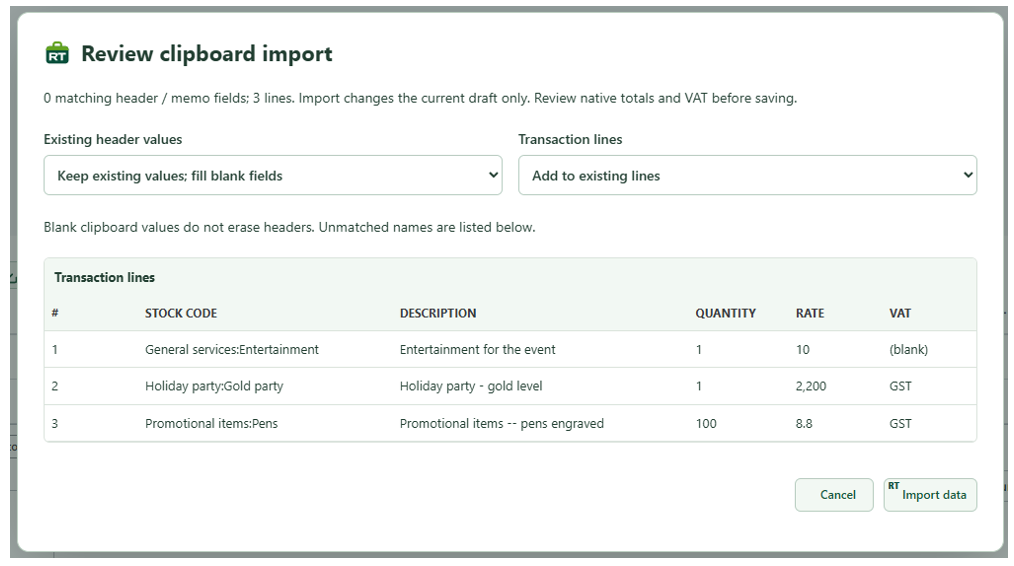
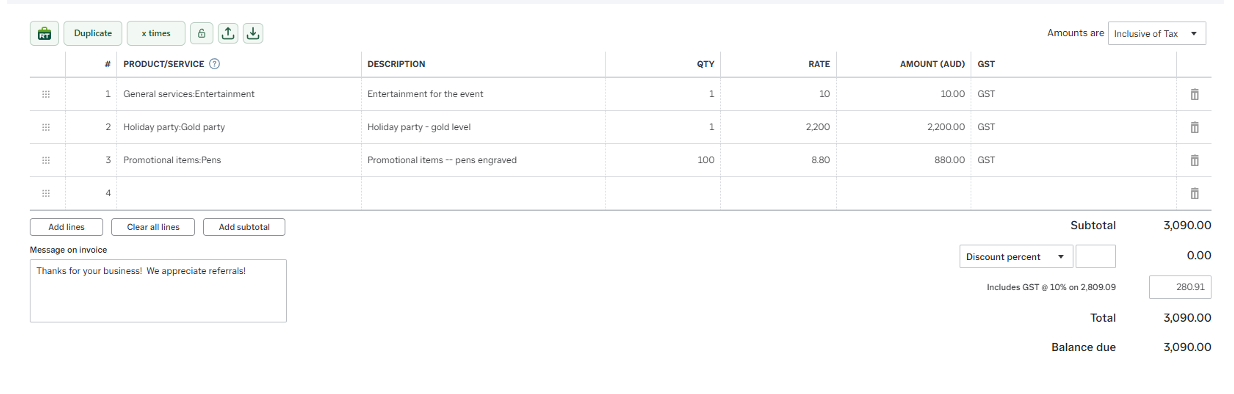
  • XQImport transaction linesv0.90

    Copy supported journals, invoices, credits, estimates or orders to a spreadsheet, make changes and paste the data into Xero or QuickBooks drafts for review before saving.

  • XQExport useful datav0.90

    Export supported customer, supplier, stock, account, VAT-code and other lists to the clipboard for use in a spreadsheet. Available lists depend on the accounting platform and company.

Banking3 features
  • QKeep the reconciliation difference visiblev1.1

    Show a floating Difference on QuickBooks reconciliation screens whenever the native Difference is outside the visible area.

  • QBank matching: Older date shortcutv1.1

    Use Older to search from five years before the current filter’s starting date through that date, keeping the other matching filters.

  • QMatch enhancementsv0.90

    Highlight the useful part of a bank reference and send it to the matching search. Use the Older shortcut to search earlier dates while retaining the other filters.

Reports8 features
  • XQSplit: Balance Sheet reportsv0.90

    Use the split drill-down button beside a supported Balance Sheet row to see its transactions in a panel on the right.

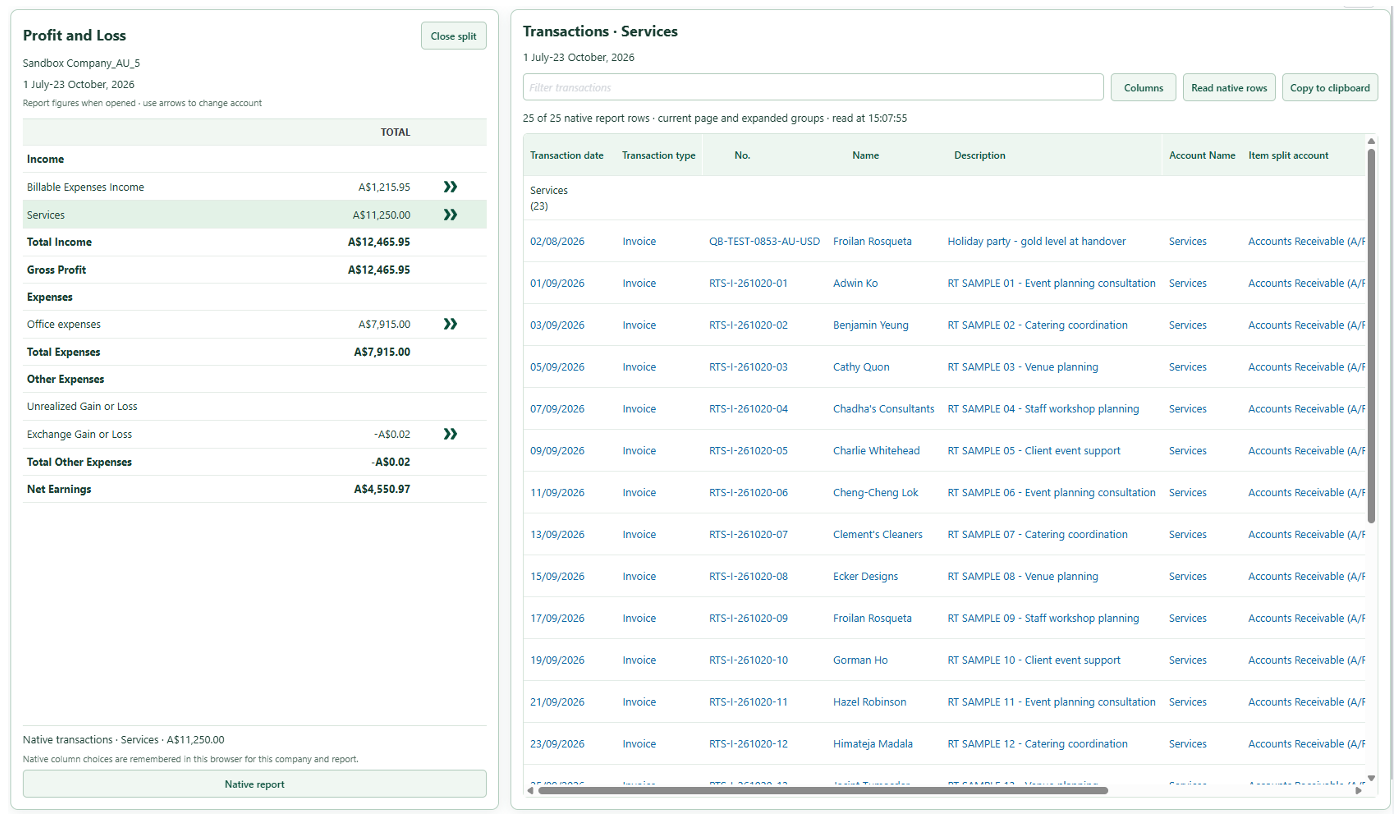
  • XQSplit: P&L reportsv0.90

    Use the split drill-down button beside a supported P&L row to see its transactions in a panel on the right.

  • XQSplit: Accounts receivable/payablev0.90

    Use the split drill-down button beside a customer or supplier on a supported receivables or payables summary to see its transactions on the right.

  • QOpen a debtor’s customer ledger from a reportv0.90

    Click a supported customer name in a QuickBooks receivables or debtors report to open the customer ledger. Supplier/payables name links are not included.

  • XQDrill down into a P&L or balance sheetv0.90

    Open supported report drill-downs in a separate tab, with visited figures highlighted in pale green.

  • QEdit an account from a P&L or balance sheetv0.90

    Click a supported account name in a QuickBooks P&L or balance sheet to open its account details for editing.

  • XQExport report to clipboardv0.90

    Copy the displayed report headings, rows, totals and comparison columns for pasting into a spreadsheet. Expand groups to include their detail.

  • XQAdjust Balance Sheet by journalv0.90

    Enter dated closing balances and choose a balancing account. RachelsTools calculates the differences and prepares a native adjustment journal draft for review before you save or post it.

Miscellaneous1 feature
  • XQAdd a link to an external websitev0.90

    Open a customer website from a ledger or supported customer transaction. Configure a URL template to pass account details; Xero uses the native account number by default, with an explicit name placeholder available.

Get up and running

Add RachelsTools to Chrome.
Start working quicker.

How to Install